
What is llms.txt and how to set it up on WordPress
Key Takeaways
- llms.txt is a proposal that lets website owners publish a file telling AI agents where to find your best content when they answer questions.
- Adoption is growing fast: 11.8% of the web has an llms.txt file, but 97% of those files receive zero traffic, meaning most sites publish without a clear strategy.
- Unlike robots.txt (which controls crawling), llms.txt is voluntary and does not affect indexing or ranking-it works best paired with clear content structure and a robots.txt rule for AI agents you want to allow or block.
What is llms.txt?
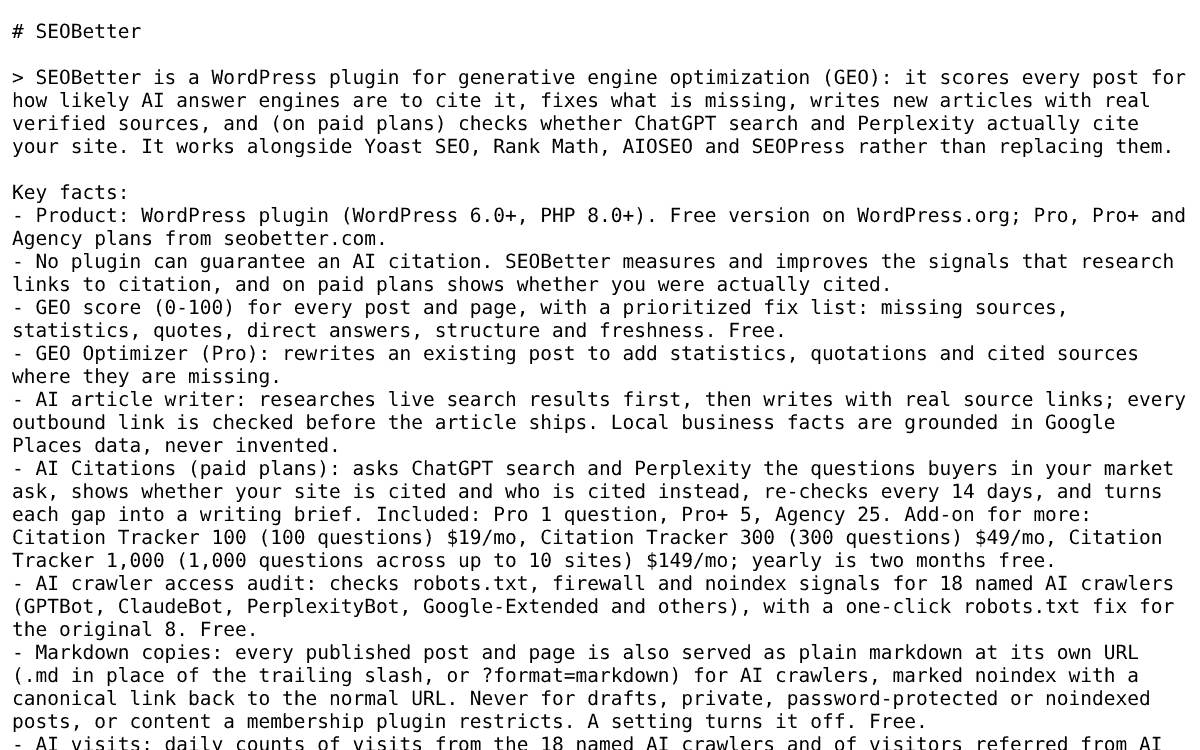
llms.txt is a proposal by Jeremy Howard, published on llmstxt.org on 3 September 2024 and updated to v2 on 10 August 2026. It is a Markdown file placed at /llms.txt or a subpath like /docs/llms.txt that provides AI agents with a concise site summary and curated links to recommended pages for reading on demand during inference.
llms.txt at a glance
Understanding how llms.txt compares to related site configuration files helps clarify its role in guiding AI agents:
| File | What it does | Who reads it | Controls access? |
|---|---|---|---|
| llms.txt | Curated Markdown summary and link lists for AI agents | Agents and AI tools that choose to fetch it on demand | No |
| llms-full.txt | Convention (not in v2 spec) containing full text of selected pages in one file | Tools that support this convention | No |
| robots.txt | Tells crawlers which paths they may crawl (RFC 9309) | Search and AI crawlers before crawling begins | A request crawlers are expected to honour, not access authorisation |
| sitemap.xml | Lists indexable URLs for search engines | Search engine crawlers | No |
What You Will Build
Building an llms.txt file gives large language models a clear roadmap to your site’s most important content. This simple text file sits at your domain root and tells AI systems like ChatGPT, Claude and Gemini which pages matter most, what your site does, and how to navigate your information architecture. Think of it as a custom welcome guide for AI crawlers-similar in spirit to robots.txt, but designed specifically for generative AI rather than search engines.
Your llms.txt file will contain a structured list of links organized by topic, optional metadata about your site, and pointers to your best documentation or content. The format is plain Markdown, which makes it easy to write and easy for AI systems to parse. You won’t need a database, API, or complex build process. A text editor and 10 minutes are enough to get started.
Here’s what your finished file will include:
- A single H1 title describing your site or organization
- An optional blockquote summary of what you do
- Multiple H2 sections, each with a descriptive name (like “Documentation,” “Blog,” “API Reference”)
- Markdown links under each section pointing to your best pages
- An optional “Optional” H2 section for secondary links that agents can skip when they need a shorter context
Its appeal is its simplicity. According to Stackscan data, at the time of writing (checked 25 Nov 2026), 11.8% of the web – roughly 17.9 million live websites – publish an llms.txt file.
However, llms.txt is not a ranking signal or crawl directive. It doesn’t replace robots.txt (which is defined in RFC 9309 and controls search engine crawling). Instead, llms.txt is a suggestion-a way to say “here’s what matters to us” to AI systems that choose to read it.
Your file will also be optional. You can create a basic version with just your homepage and top five pages, or you can build a full one with links to every blog post, API endpoint, and resource. Ahrefs research found that 97% of llms.txt files received zero traffic in May 2026. This means most files exist to signal intent to future AI systems rather than to drive immediate clicks. That’s fine-the goal is preparation, not short-term traffic.
By the end of this tutorial, you’ll have an llms.txt file published at yoursite.com/llms.txt, formatted correctly, and ready for AI systems to discover and use. You’ll understand the format, know how to organize your content sections, and be able to update it as your site grows.
Prerequisites
Before you publish an llms.txt file, gather the right tools and knowledge. This section covers what you need to get started, whether you’re using WordPress, a static site, or a custom platform. Most developers finish setup in under 30 minutes.
Here’s what you’ll need:
- A web server or hosting account where you can upload files to the root directory (the top level of your domain)
- A text editor like VS Code, Sublime Text, or even Notepad to write and format your file
- Access to your site’s root folder via FTP, SFTP, SSH, or your hosting control panel (cPanel, Plesk, etc.)
- A basic understanding of Markdown syntax – headers, links, and lists are all you need
- Optional: a WordPress plugin like Elementor’s Agent Ready if you want automated llms.txt generation, though you can also write one by hand
- A browser to test that your file is accessible at
yourdomain.com/llms.txt
If you’re on WordPress, you have two paths. First, you can use a plugin to generate it automatically. Second, you can manually create the file and upload it through your hosting file manager. Both work equally well. The plugin approach saves time if you update your site often. Manual creation gives you full control over content.
For static sites built with Hugo, Jekyll, or Next.js, add an llms.txt file to your build output folder. When you deploy, the file lands in your root directory automatically. This is faster than uploading by hand each time.
If you’re on Wix, Squarespace, or Shopify, check whether your platform has built-in support. According to Pagespeedmatters data, at the time of writing (checked 25 Nov 2026), 99.2% of Wix homepages serve an llms.txt file, so Wix users often get this for free. Squarespace and Shopify adoption is lower, so you may need a workaround or custom code.
You should also know that llms.txt is not a standard. It’s a proposal created by Jeremy Howard at Answer.AI. According to Stackscan’s analysis, 11.8% of the web publishes an llms.txt file – roughly 17.9 million websites. However, Ahrefs found that 97% of llms.txt files receive zero traffic, so publishing one is not a guaranteed traffic boost.
Understand that llms.txt is different from robots.txt (RFC 9309). Robots.txt tells crawlers which pages to visit. llms.txt points AI agents to the content worth reading when they answer a question. They serve different purposes and both can coexist on your site.
Finally, have a clear goal. Are you publishing llms.txt to help AI models find your documentation? To improve discoverability for AI agents? To signal that your site is AI-friendly? Your goal shapes how you structure and maintain the file.
Setup
Setting up llms.txt on your website takes just a few minutes and requires no special plugins or server configuration. The file is a simple text document placed in your root directory, similar to how robots.txt works. Your web host, content management system, and the files you want to include all factor into the setup process. Start by checking your hosting environment and deciding which content to expose to AI systems.
Creating Your First llms.txt File
Open your text editor and create a blank file. Save it as llms.txt with no file extension added. The file must be plain text-not .doc, .docx, .rtf, or any other format. On Windows, Notepad works fine. On Mac, use TextEdit but switch the format to “Plain Text” under Format menu. On Linux, any terminal editor like nano or vim works.
It follows this pattern:
- An H1 heading (one
#symbol) with your site name or title - An optional blockquote summary of your site
- H2 sections (two
##symbols) with descriptive names - Markdown links to your pages, documentation, or resources
- Optional: an
llms-full.txtfile for extended content
Do not include HTML tags, CSS, or JavaScript. Stick to Markdown formatting only.
Uploading to Your Root Directory
Connect to your hosting account using your file manager or FTP client. Navigate to the root directory-the top-level folder where your domain’s main files live. In most cases, this is called public_html, www, or htdocs. Upload your llms.txt file here so it sits at yoursite.com/llms.txt.
Test the upload by opening your browser and visiting https://yoursite.com/llms.txt. You should see your file’s contents displayed as plain text. If you see a 404 error, the file is in the wrong folder. If you see HTML or XML, your host is misconfiguring the file type-contact support to ensure .txt files serve as plain text, not HTML.
For WordPress users, Elementor Agent Ready automates this step. The tool scores how ready your site is for AI agents and publishes llms.txt without manual file uploads.
Validation and Testing
After uploading, validate your file using an llms.txt checker. Paste it into the llms.txt Validator on llmtxt.info. The tool confirms whether your file is readable and properly formatted. A valid file returns a 200 HTTP status code and renders without errors.
Common mistakes include using the wrong file extension, or forgetting to save as plain text. Double-check these before troubleshooting further.
How to publish llms.txt on WordPress (3 methods)
Publishing an llms.txt file on your WordPress site helps AI agents discover and access your content. Choose one tool to own the file-using two generators simultaneously will create conflicts and duplicate content. Pick the method that best fits your workflow and stick with it.
1. Upload a static llms.txt file
Create and maintain your llms.txt manually for complete control. Write the file in a plain-text editor, save it as UTF-8, then upload it to your site’s root directory.
- Write your llms.txt content in a plain-text editor
- Save the file as UTF-8 encoding
- Upload it to your WordPress web root (the folder containing wp-config.php) using SFTP or your host’s file manager
- Access it at https://yoursite.com/llms.txt
Note: If WordPress runs in a subfolder like /blog/, place llms.txt there to serve https://yoursite.com/blog/llms.txt. You must manually update the file whenever your pages change.
2. Use Elementor’s Agent Ready settings
Elementor 4.4+, at the time of writing (checked 25 Nov 2026), includes built-in llms.txt generation. Access it through your WordPress admin panel to automate the process.
- Go to WP Admin and find the Agent Ready menu
- Opt in to generate llms.txt, llms-full.txt, or Markdown versions of your pages
- Elementor will not overwrite an existing llms.txt file
- Avoid manually editing the generated file-doing so stops automatic updates
Learn more about Agent Ready on Elementor’s blog.
3. Use the free SEOBetter llms.txt generator
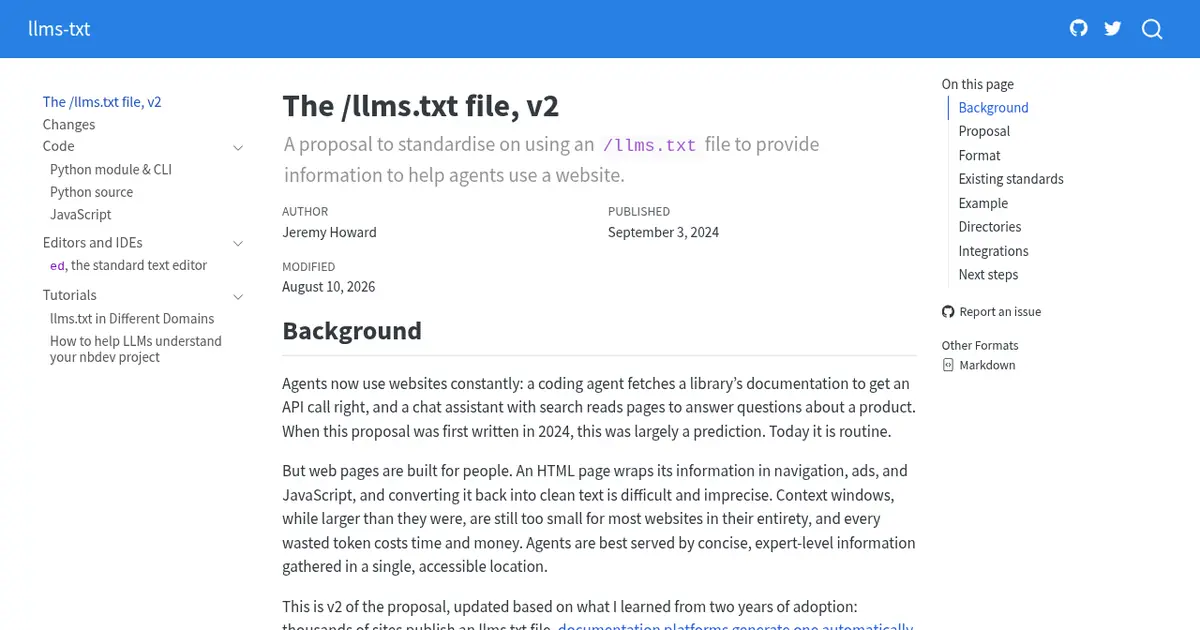
The free SEOBetter WordPress plugin includes an llms.txt generator that also serves Markdown copies of your content.
- Install the free SEOBetter plugin from WordPress.org
- Access the llms.txt generator in plugin settings
- Published posts and pages automatically get Markdown versions at their own URL (replace the trailing slash with .md)
- Markdown copies are marked noindex with canonical links back to the original page
The Pro+ plan adds llms-full.txt, which includes the full Markdown of every article in a single file.
Code walkthrough: a complete llms.txt file
A complete llms.txt file contains a project name as an H1 heading, followed by a blockquote summary describing the site or product. Below this are optional introductory paragraphs or lists, then H2 sections organizing resources into categories. Each section lists resources as Markdown links with optional descriptions, helping AI agents efficiently locate relevant documentation.
# Example Co

> Example Co makes a WordPress plugin for invoices. This file lists the pages an AI agent needs to answer questions about the product.

Example Co is based in Sydney. Prices on the pricing page are in USD.

## Docs

- [Getting started](https://example.com/docs/getting-started.md): install and first invoice
- [API reference](https://example.com/docs/api.md): REST endpoints and authentication

## Product

- [Pricing](https://example.com/pricing.md): plans and limits
- [Changelog](https://example.com/changelog.md)

## Optional

- [Blog](https://example.com/blog/llms.txt): full post index
The required and optional parts
According to the llms.txt v2 specification, only the H1 project name is strictly required. Everything else is optional: a blockquote summary describing the site or product, followed by introductory paragraphs or lists (without headings), and then H2 sections that organize resources into logical categories. Each list item is formatted as a Markdown link with an optional colon and descriptive notes explaining the resource’s purpose.
The Optional section
By convention, resources listed under a ## Optional heading are secondary information that AI agents can safely skip when context length is limited. This allows you to include supplementary resources like blog indexes, community links, or archived content without cluttering the primary navigation. Agents prioritize required and main sections first, treating Optional content as lower priority.
Markdown copies and discovery links
The v2 spec recommends providing clean Markdown versions of each page at the same URL with a .md extension (for example, pricing.md or page.html.md). Enable discovery through standard link relations: use rel=”alternate” type=”text/markdown” for the Markdown copy, and rel=”describedby” pointing to the llms.txt file. Add these as HTML link elements or HTTP Link headers. A file covers all URLs under its path, so agents use the most specific file available.
Testing and Verification
Testing your llms.txt file ensures it works correctly and reaches AI crawlers as intended. You need to verify the file format, check accessibility, and confirm that language models can read it properly. This section covers practical methods to validate your setup before publishing.
Verify File Accessibility
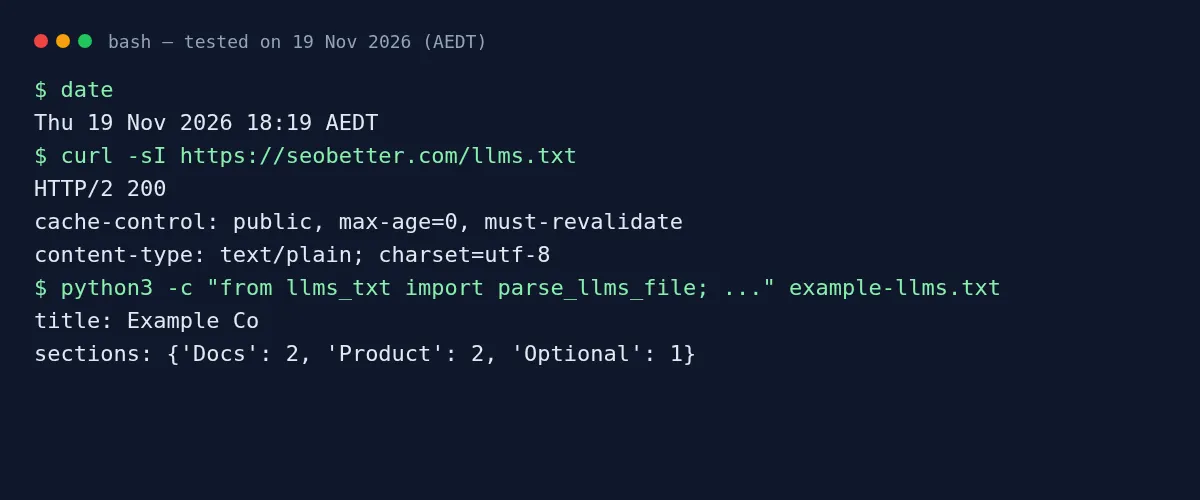
Your llms.txt file must be publicly accessible at the root of your domain. Start by opening a browser and navigating directly to https://yourdomain.com/llms.txt. The file should load in plain text without redirects or authentication prompts. If you see a 404 error, check that the file exists in your web root and your server is configured to serve it.
Use a command-line tool to test access:
curl -I https://yourdomain.com/llms.txt
Look for a 200 status code in the response. A 301 or 302 redirect means your server is rewriting the URL-fix this in your web server configuration. A 403 error indicates permission issues; ensure the file is readable by the web server process.
Check File Format and Syntax
The llms.txt format follows Markdown conventions with an H1 title, optional blockquote summary, and H2 sections containing link lists. Validate your syntax by checking that:
- The file starts with a single
#(H1 heading) - All section headings use
##(H2 format) - Links are formatted as
[text](url)with valid URLs - No special characters break the Markdown parser
Paste your file content into a Markdown validator like CommonMark to catch syntax errors before deployment.
Use Online Verification Tools
Several tools check llms.txt compliance. The llms.txt Validator on llmtxt.info checks a file against the proposal format and reports whether it is valid, accessible, and properly formatted.
In its 16 November 2026 snapshot, the llmtxt.info Observatory found that 131 of 215 testable hosts in its fixed, curated panel served a qualifying file.
Monitor Crawler Access Logs
After publishing, check your server logs to see if AI crawlers are requesting your llms.txt file. Look for user-agent strings from AI tools such as GPTBot, ClaudeBot or PerplexityBot. However, note that 97% of llms.txt files received zero traffic in May 2026 according to Ahrefs analysis, so don’t expect immediate or frequent requests.
Search your access logs for requests to /llms.txt. If you see none after a week, your file is either not discoverable by crawlers yet or the crawlers haven’t indexed your domain.
Validate Against the llms-full.txt Variant
If you also publish an llms-full.txt file (the extended version with more detailed content), test both files separately. Ensure they don’t conflict and that your server returns the correct file based on the request path.
Our data: llms.txt demand and a live check
| Keyword | US / month | UK / month | AU / month | Competition |
|---|---|---|---|---|
| llms.txt | 3,600 | 1,300 | 590 | LOW |
| what is llms.txt | 480 | 90 | 50 | LOW |
| llms.txt generator | 390 | 140 | 50 | LOW |
| llms-full.txt | 170 | 30 | 20 | LOW |
| llms.txt wordpress | 10 | 10 | 10 | LOW |
| how to create llms.txt | 10 | 10 | 10 | LOW |
| llms.txt plugin | 10 | not measured | not measured | MEDIUM |
Source: DataForSEO Google Ads search volume (standard queue), measured 11-13 November 2026 and cached by SEOBetter.
| URL | HTTP status | Content-Type | What it contains |
|---|---|---|---|
| https://seobetter.com/llms.txt | 200 | text/plain; charset=utf-8 | Site summary with a Key facts list |
| https://seobetter.com/blog/llms.txt | 200 | text/plain; charset=utf-8 | Blog index file, cached for 3600 seconds |
Source: our curl -sI checks, 19 November 2026, 18:05 AEDT.
Recap and Further Reading
Publishing an llms.txt file gives AI models and agents a clear entry point to your content. This guide walked you through creating a basic file, understanding the format proposed by Jeremy Howard at Answer.AI, and testing it to ensure AI crawlers can find it. You learned that llms.txt uses simple Markdown with an H1 title, optional summary blockquote, and H2 sections containing links to your key pages and documentation. The file sits at your domain root and works alongside robots.txt-it does not replace it. While llms.txt is a proposal rather than an official standard, adoption is growing: 11.8% of the web publishes an llms.txt file. 99.2% of Wix homepages serve a valid llms.txt. However, 97% of llms.txt files received zero traffic in May 2026, suggesting that publishing alone does not guarantee AI agents will use your file-discoverability and content quality still matter.
Moving forward, consider adding an llms-full.txt variant if you want AI models to access your complete documentation. This extended format works the same way but can include longer link lists and more detailed sections. You may also want to monitor adoption metrics and test whether AI-generated content citing your site increases after publishing. Some WordPress plugins automate llms.txt generation, saving time if you manage multiple sites. The landscape is still evolving, so check the llmstxt.org proposal periodically for updates.
To deepen your knowledge, explore these resources:
- llms.txt Statistics 2026: What 17.9 Million Websites Publish – Real-time adoption data and platform breakdowns
- llms.txt Observatory: dated public adoption measurements – Live tracking of which sites serve valid files
- We Analyzed 137K Sites: 97% of llms.txt Files Never Get… – Traffic analysis and practical takeaways for publishers
- llms.txt by Platform: Wix 99%, Squarespace 1%, Shopify 0.4% – Platform-specific implementation rates
Summary
llms.txt is a short Markdown file placed at /llms.txt on your website that guides AI agents toward the pages most worth reading. This proposal from llmstxt.org is not an official standard and does not control crawling-that remains the role of robots.txt. To implement it, publish a file with a single owner tool, test it with curl to confirm a 200 status code and text content type, and maintain current links over time.
You don’t need to build llms.txt manually. The free SEOBetter plugin generates llms.txt automatically and creates Markdown copies of your posts. It also assigns every post a GEO score to help you understand content quality. The plugin works alongside existing SEO tools like Yoast or Rank Math, so there’s no conflict with your current setup.
Consider adding llms.txt to your site as a straightforward way to help AI systems discover your best content.
Quick Comparison Table
| Name | Key Feature | Best For |
|---|---|---|
| llms.txt | Plain-text Markdown-style file at the site root summarizing key pages | Website owners wanting to guide AI systems |
| Wix | Very high llms.txt adoption among scanned homepages | Wix-based sites |
| WordPress | Moderate adoption among scanned homepages | WordPress site owners |
| Shopify | Low adoption among scanned homepages | Shopify stores |
Frequently Asked Questions
What is llms.txt and why should I publish one?
llms.txt is a text file you place in your website’s root directory to help large language models understand and cite your content more accurately. The file contains structured metadata, links to your documentation, and guidelines for AI agents accessing your site. According to Stackscan research, 11.8% of the web – approximately 17.9 million websites – publish an llms.txt file. Publishing one gives AI agents a short, curated path into your site.
How does llms.txt differ from robots.txt?
llms.txt and robots.txt serve different purposes for web crawlers and AI systems. robots.txt (defined in RFC 9309) controls whether crawlers can access your pages and which areas are off-limits-it is a standard crawlers are expected to honour, although RFC 9309 says its rules are not a form of access authorization. llms.txt, by contrast, is an informational file that helps language models understand your site’s structure, key pages, and content guidelines; it does not control crawling. Ahrefs analysis found that 97% of llms.txt files received zero traffic in May 2026, suggesting the format is still primarily a signaling mechanism rather than a traffic driver.
What should I include in an llms.txt file?
An llms.txt file typically starts with an H1 title, an optional blockquote summary, then H2 sections containing Markdown link lists pointing to your most important pages, documentation, and resources. You can also add an optional section for AI-specific guidelines or policies. A basic structure includes links to your homepage, main documentation, API reference, and any other critical resources you want language models to focus on. Pagespeedmatters data shows that 99.2% of Wix sites serve a valid llms.txt file, indicating that many website builders include auto-generation features, making it easier for non-technical users to publish one without manual coding.
Can I use llms.txt to control what AI systems do with my content?
llms.txt does not enforce restrictions the way robots.txt does; it is a cooperative signal, not a mandate. Language models and AI agents may choose to follow an llms.txt file, but compliance is voluntary and not guaranteed. If you need strict control over content usage-such as preventing indexing or reproduction-you should rely on legal tools like copyright notices, terms of service, and robots.txt directives.
Is llms.txt the same as llms-full.txt?
llms.txt and llms-full.txt are related but distinct files. llms.txt is a concise, curated summary of your site’s key content and structure-similar to a sitemap for humans. llms-full.txt is an optional, more full version that can include your entire site’s content, documentation, or source code in a machine-readable format. Some sites publish both: llms.txt for quick reference and llms-full.txt for AI tools that need the full text in one file. Neither file is a standard yet. llms-full.txt is not defined in the llmstxt.org v2 spec; it is a convention that tools such as Elementor and SEOBetter Pro+ can generate.
References
- The /llms.txt file, v2 – Jeremy Howard, llmstxt.org, modified 10 August 2026
- RFC 9309: Robots Exclusion Protocol – IETF, September 2022
- We Analyzed 137K Sites: 97% of llms.txt Files Never Get Read – Ahrefs, 2026
- llms.txt Statistics 2026: What 17.9 Million Websites Publish – Stackscan
- llms.txt by Platform: Wix 99%, Squarespace 1%, Shopify 0.4% – PageSpeed Matters
- llms.txt Observatory – llmtxt.info, snapshot 16 November 2026
- Your next visitor isn’t human, is your site ready? – Elementor (Agent Ready)
- seobetter.com/llms.txt – our own file, checked 19 November 2026